Your shift schedule, always at hand
Relevo is the app for people who work shifts: paint your month in seconds, see today’s shift with a countdown and find which days off you share with your partner or coworkers.
- No account
- No ads
- Your calendar lives on your phone
What Relevo does
-
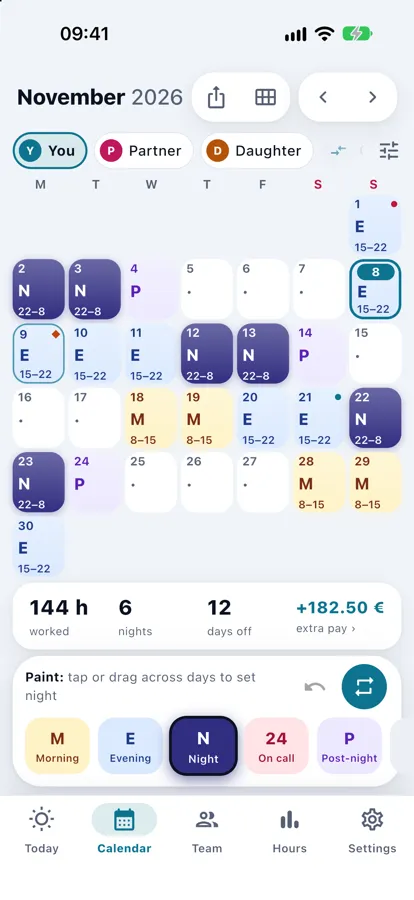
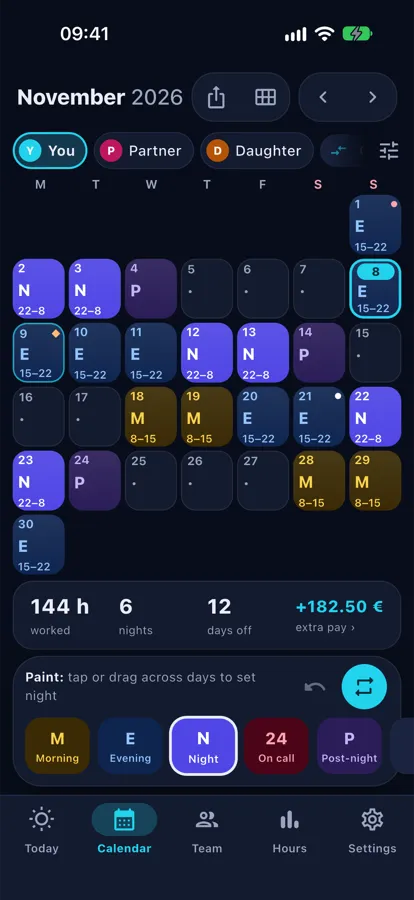
Paint your month in seconds
Pick your sector and a typical rotation (say 2 mornings, 2 afternoons, 2 nights, a post-night rest and 3 days off) and Relevo fills in your shifts. If a day changes, tap or drag a finger across the days to paint it.
A healthcare example → -
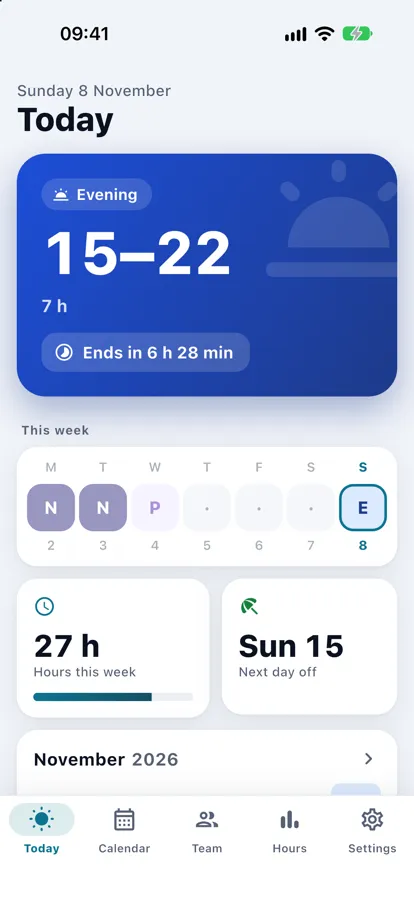
Today’s shift, with a countdown
The Today screen tells you what you’re on and how long until it starts or ends. Nights that cross midnight show as “in progress”, not as a day off.
How nights are counted → -
Widgets and watch
Widgets on the iPhone Home and Lock Screen, an Apple Watch app and complication, and Siri or Shortcuts to ask “what shift do I have tomorrow?”.
-
Reminders and alarms
A reminder before every shift, even when the app is closed, and another before it ends. On iOS 26 or later, also a real alarm that rings like an alarm clock.
-
Import your rota from a photo
Take a photo of the rota or open the PDF, pick your row and check the month. Reading happens on your phone and the photo never leaves it.
The five steps → -
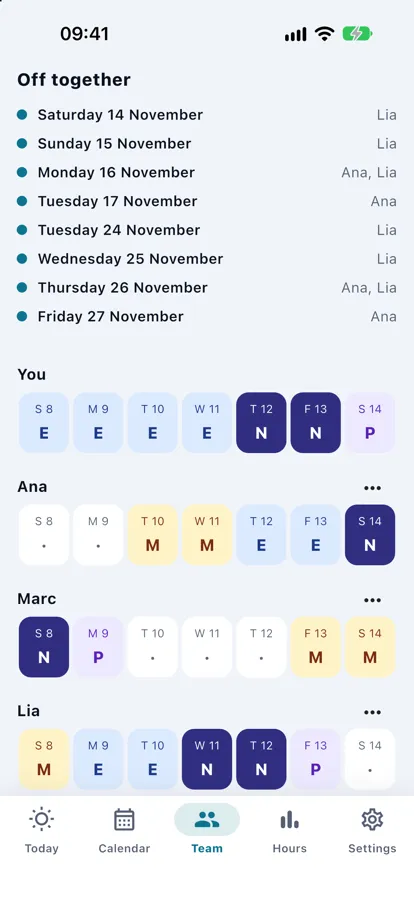
Days off together
Share your calendar with a link, no accounts, and see which days you and your partner or coworkers are off at the same time. Others see only your shifts, never your notes.
How it works → -
Shift swaps
Propose a swap to a coworker with a link, or post “looking for cover” to the group. The app warns you about short rests and overlaps before you accept.
-
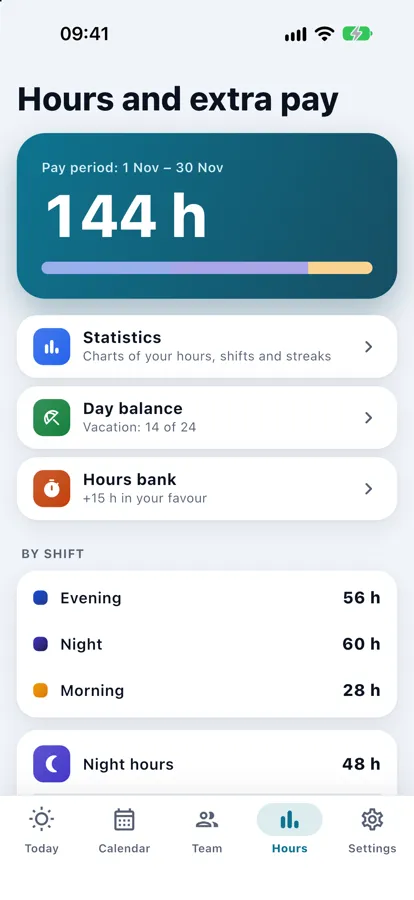
Your hours and holidays
Monthly hours, nights and days off at a glance, with Spain’s national and regional public holidays (local ones you add yourself). Export the month as an image, PDF or .ics.
See Relevo in action
Real screenshots of the app on iPhone.
Made for people who work shifts
When you start, you pick your sector and Relevo gives you the most common shifts and rotations as a starting point. The hours are examples: swap in your own.
-
Healthcare
Morning, afternoon, night, post-night rest and 24-hour guard shifts, with four starter rotations.
See the guide → -
Security
24-hour guard shifts, nights and post-night rest. For a 12x36 pattern, a cycle of one day on and one day off.
See the guide → -
Factory
Morning, afternoon and night shifts, and cycles of several days on and days off.
See the guide → -
Retail
Morning and afternoon shifts, week by week or by days on and days off.
See the guide →
A healthcare cycle, as an example
Two mornings, two afternoons, two nights, a post-night rest and three days off: ten days that repeat.
- M
- M
- E
- E
- N
- N
- P
- O
- O
- O
M morning · E afternoon · N night · P post-night rest · O off. This is an example of the cycle, not a screenshot of the app.
Guides to understand your rota
You can follow them without installing anything: each one comes with a worked example.
-
12x36 shifts
Twelve hours on and thirty-six off: a four-week example with days and hours.
Read the guide → -
Nursing and healthcare
Morning, afternoon, night, post-night rest and day off: a typical four-week rotation, with its hours.
Read the guide → -
Post-night rest day
What the post-night rest day is, which day a night belongs to and whether it counts as a day off.
Read the guide → -
Rotating 4x2, 6x2 and 5x2
Four weeks of each, with working days, days off and hours, and what happens to weekends.
Read the guide → -
From paper to phone
Importing your row from a rota with a photo or a PDF: steps, limits and privacy.
Read the guide → -
Days off together
How to find the days you’re off at the same time as your partner or team, without accounts.
Read the guide →
Frequently asked questions
Is Relevo free?
It’s a free download and the essentials are free: calendar, rotations, reminders and alarms, widgets and watch, Siri and Shortcuts, importing your rota, exporting the month (image, PDF or .ics), statistics, shift swaps, backup, one extra calendar and up to three coworkers on your team. Relevo Pro adds iCloud sync between your devices, more calendars and comparing three or more, an hours bank, a days balance, pay estimates in your currency, more than three coworkers and colours for the app. It’s offered as an annual subscription (with a free trial where the store gives you one) or a one-time purchase; you see the price in the App Store.
Do I need to create an account?
No. Relevo works from the very first launch without signing up, and sharing your calendar doesn’t need accounts either: it’s done with a link.
Are there ads?
No. Relevo has no ads.
What data leaves my phone?
Your calendar lives on your phone and goes into your backup. Only what you choose to send leaves it: the shifts for each day that you share with your team (never your notes, shift swaps, overtime or pay), whatever you send from the share sheet (image, PDF, .ics, swap proposals) and, if you turn on iCloud sync (Pro), your iCloud. The photo of a rota you import is read on your phone and never leaves it. More detail in Relevo’s privacy policy.
Is there an Android version?
Not yet: it isn’t published on Google Play. Today Relevo is on the App Store for iPhone and iPad, with an Apple Watch app.
Does it work out what I’ll be paid?
It calculates the hours, nights and holidays you work from your shifts. With Pro you can enter your own rates and see an indicative pay estimate, which is never your payslip: you set the rates and your working hours because they depend on your contract and employer, and Relevo states no legal figures.
Does it include public holidays?
It includes Spain’s national and regional public holidays. Local ones you add yourself. If you choose another country, it has no holidays and you enter them by hand.
Does it work for 12x36, 4x2 or 6x2 patterns?
Yes. With “Work and rest days” you set how many days you work and how many you rest (1 to 28 each) and choose a shift with the hours you define; that’s how you set up a 12x36 (12 hours on, 36 off) or a 4x2, 6x2 or 5x2. You can also define any cycle day by day.
Relevo helps you keep your calendar; it is not employment advice. Hours, rest periods and extras depend on your contract and employer. Privacy policy.